
Shubham Upadhyay

Senior Backend Architect

Open to Collaborate
Bengaluru, IN
Connect Channels
DEVELOPER PLATFORM 2023 – Present

ShubhamLabs

Building a Developer Platform from Real Engineering Problems

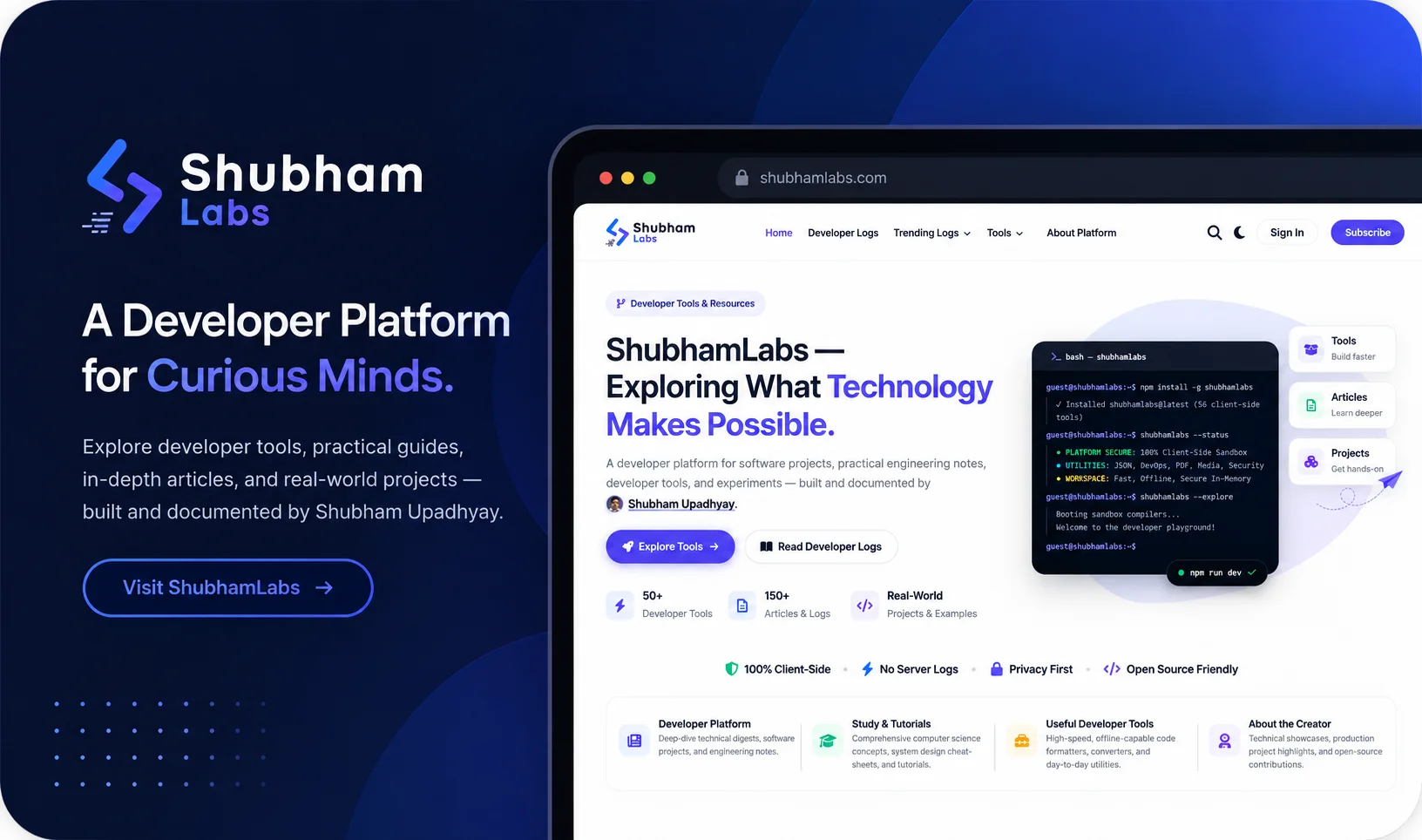
ShubhamLabs is a developer platform I built to bring together developer tools, practical engineering notes, architecture experiments, and open-source projects rooted in real software engineering problems.

ShubhamLabs Preview
01.

Project Overview

ShubhamLabs is a developer platform I built to bring together the things I work on as a software engineer — developer tools, engineering notes, practical tutorials, experiments, and open-source projects.

I did not want to build another personal blog or a website that simply lists my skills.

Today, the platform combines browser-based developer utilities, technical articles, engineering experiments, and selected open-source projects in one place.

“If I solve a problem while building software, I should be able to turn that solution into something useful for another developer.”

02.

Why I Started ShubhamLabs

Over the years, I have solved a lot of small problems while working on real applications.

Sometimes it was something simple like formatting or converting data. Sometimes it was debugging an API, understanding performance issues, working with databases, designing an architecture, or figuring out a better development workflow.

A lot of those solutions normally stay inside a project or disappear into an old conversation, terminal session, or browser tab.

I wanted to change that. Instead of solving the same type of problem again and again, I started turning useful solutions into reusable tools, notes, and experiments. That is where ShubhamLabs came from.

03.

The Problem I Wanted to Solve

There are already thousands of developer websites and tools available. The problem was never a lack of information — the problem was finding something genuinely developer-centric:

I also wanted the platform to represent how I actually learn and build software. I don't learn everything from a textbook first.

Most of the time, I start with a problem, investigate it, build something, test it, and then understand what actually worked. I wanted ShubhamLabs to follow the exact same process.

  • Practical and quick to use in day-to-day engineering
  • Easy to understand without wading through clutter or popups
  • Focused directly on a real development problem
  • Privacy-conscious with zero data egress or server retention
  • Useful without unnecessary complexity or setup friction
04.

My Approach

I designed the platform around a disciplined, problem-first workflow. A tool or article should not exist just because it looks useful — it should solve a problem that developers actually face.

For example, if I repeatedly need a small utility during development, I would rather build a focused browser tool than keep searching for the same utility every time. If I spend hours understanding a technical concept, I document the important parts so that I — or another developer — can come back to it later.

This approach became the product philosophy behind ShubhamLabs.

ENGINEERING PHILOSOPHY & WORKFLOW
1 Problem
2 Research
3 Build
4 Test
5 Improve
6 Share
05.

What I Built

ShubhamLabs is divided into three major engineering areas, each designed with consistency, privacy, and utility at its core:

Developer Tools

A growing collection of browser-based utilities for common development tasks, designed to run directly inside the browser:

  • JSON formatting, validation, conversion, tree visualization & querying
  • Code and data generators, image utilities & sitemap generation
  • Regular-expression utilities & developer productivity helpers
  • Docker-related generators, security and encoding utilities

Engineering Logs

Hands-on technical documentation written from an engineer's point of view rather than academic theory:

  • What problem were we trying to solve?
  • Why did the problem happen under the hood?
  • What architectural options did we have?
  • What actually worked in production?
  • Where should this approach be used (and where not)?

Open-Source Projects

A home for deeper architectural experiments, backend systems, CLI applications, AI integrations, and performance engineering:

  • ArchMCP — Central Remote Model Context Protocol Server for Microservices
  • SQL Doctor — High-performance Go CLI for database diagnostics & EXPLAIN
  • ClipNest — Privacy-first clipboard history daemon and web manager
  • PHP Concurrency — High-throughput async non-blocking HTTP client
06.

Architecture & Privacy by Design

One of the most important decisions I made was to keep the developer-tool experience as client-side as possible. For utilities where server processing is unnecessary, the browser performs the work locally.

This means that for client-side utilities, the user's input does not need to travel to my server just to perform a simple transformation. Many developer tools deal with data that users may not want to upload anywhere.

Privacy was not something I wanted to add later as a marketing statement — it was part of the architecture.

“If the browser can safely do the job, let the browser do the job.”

User Browser
(Client-Side Runtime)
←––→
Edge CDN
(Global Static Assets)
–––→
Browser Tool
(Client App)
Local Engine
(WASM / Web Worker)
IndexedDB
(Local Persistence)
–––→
Target Databases & APIs
Zero Egress
(100% Private)
Instant UI
(Sub-10ms Feedback)
PWA Cache
(Offline Ready)
07.

Building Many Small Tools as One Platform

One challenge was deciding how to build dozens of utilities without turning the platform into a collection of unrelated pages. I wanted every tool to feel like part of the same product. A developer should be able to open one tool and immediately understand how another tool works.

Design & UX Consistency

  • Common UI patterns and unified input/output layouts.
  • Reusable web components with consistent design tokens.
  • Predictable navigation and shared header controls.
  • Standardized error handling, notifications, and copy interactions.
  • Mobile-responsive behavior and accessibility across all utilities.

Platform Systems

  • Centralized tool registry driving metadata, routes, and sitemaps.
  • Single codebase preventing fragmentation across utilities.
  • Instant search discoverability and category tagging.
  • Seamless transitions between tools, engineering logs, and tutorials.
  • Consistency that scales naturally as new tools are added.
08.

Keeping the Tools Fast

For small developer utilities, performance latency can easily become worse than the problem they are trying to solve. I did not want a simple formatter or converter to require a complicated backend request just to return a result. Where possible, processing happens directly in the browser.

Architectural Advantages

  • Less network dependency and sub-10ms transformation feedback.
  • Zero server-side compute bottlenecks during heavy traffic.
  • Full offline potential with Progressive Web App (PWA) caching.
  • Simpler, resilient infrastructure with zero backend downtime.

Developer Impact

  • Unbreakable privacy — sensitive code and tokens never leave the browser.
  • Substantially lower server workload and $0 monthly compute costs.
  • Fast, frictionless feedback loops that encourage rapid iteration.
  • Thoughtful handling of browser limits and client memory budgets.
09.

SEO & Discoverability as a Core Challenge

A developer tool is only useful if developers can actually find it.

I therefore treated each useful utility as its own searchable resource rather than hiding everything behind a single tools page.

The goal is not simply to rank a page. The goal is that a developer searching for a specific problem can land directly on the tool that solves it.

  • Meaningful, keyword-accurate page titles and tailored meta descriptions
  • Structured content with JSON-LD schema markup for web tools
  • Strategic internal linking between tools, related concepts, and deep-dive logs
  • Clean, predictable tool-specific URLs that developers can bookmark
  • Useful documentation accompanying each tool explaining edge cases
  • Related tools cross-links allowing seamless transitions between workflows
10.

Turning Tools Into Learning Resources

Another decision I made was to not stop at the tool itself.

A developer may know what a JSON minifier does but still want to understand: why minification is useful, what changes during minification, what should not be removed, how it affects payload size, and where it fits into a production workflow.

So the platform explains the problem around the tool as well. This establishes a continuous connection between practical utility and technical understanding:

Tool Explanation Example Related Tools
11.

What I Learned While Building It

Building ShubhamLabs taught me that building a platform is very different from building a single application.

With a normal project, I can optimize the solution for one product requirement. With a platform, every decision affects many future features.

A component that works for one tool may need to support twenty more. A URL structure that looks fine today may become difficult when the platform grows. A small architectural shortcut can become repetitive technical debt.

So I started thinking more about reusable systems, conventions, consistency, maintainability, discoverability, scalability, and developer experience. That mindset is probably one of the biggest things I gained from this project.

12.

What Makes ShubhamLabs Different

I don't want ShubhamLabs to become just another collection of random developer utilities. The long-term idea is to connect everything back to real engineering work.

A problem can become a tool. A difficult implementation can become an engineering log. An experiment can become an open-source project. A project can produce another technical article.

So the platform becomes a continuous cycle:

THE SHUBHAMLABS ENGINEERING CYCLE
1 Real Problem
2 Build
3 Learn
4 Document
5 Create a Tool / Project
6 Share
7 Help Another Developer

“Build. Learn. Share. Repeat.”

13.

Current State & What I Want to Build Next

ShubhamLabs is already being used as my space for developer tools, engineering documentation, technical experiments, open-source projects, and practical development notes. But I consider it an ongoing project rather than a finished product. There are still many things I want to improve.

Current State

  • Active space for 50+ privacy-first web utilities in production.
  • Practical engineering logs and systems architecture notes.
  • Open-source flagships: ArchMCP, SQL Doctor, ClipNest, PHP Concurrency.
  • 100% client-side privacy architecture with zero server logging.

What I Want to Build Next

  • More advanced developer utilities with WebAssembly AST compilers.
  • Reusable open-source packages and developer CLI tooling.
  • Better documentation and edge-case explanations around tools.
  • Deeper system-design content and performance benchmarks.
  • AI-assisted developer workflows keeping data strictly local.
  • Better connections between projects, tools, and technical articles.
14.

Project Information

Summary specifications for the ShubhamLabs platform:

Project ShubhamLabs
Type Developer Platform
Focus Developer Tools, Engineering Logs, Open Source
Role Founder & Developer
Status Actively maintained
Chat on WhatsApp
Navigating...