
Shubham Upadhyay

Senior Backend Architect

Open to Collaborate
Bengaluru, IN
Connect Channels
DEVELOPER TOOL / AI 2024 – Present Verified by M8ven

ArchMCP

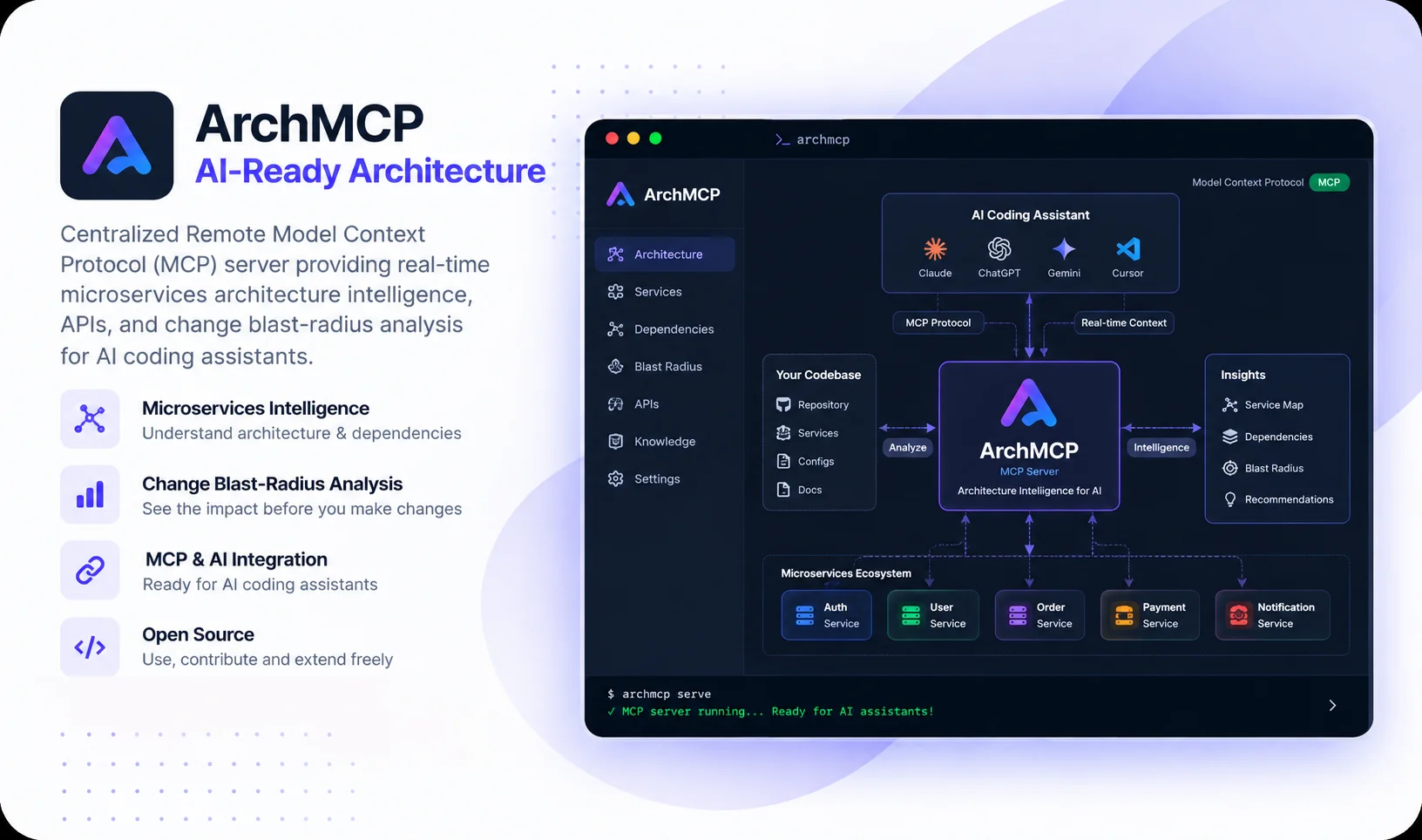
Giving AI coding assistants a live map of your microservices, APIs, and dependencies.

ArchMCP scans polyglot microservices to build an in-memory architecture index. Instead of pasting entire repositories into prompts, AI coding assistants can query only the specific services, endpoints, and downstream dependencies they need.

ArchMCP Preview
01.

The Problem: Coding Assistants Only See What's Open in Your Editor

When working on modern microservices, AI coding assistants like Cursor, Claude Desktop, and Antigravity are great at editing single files or writing functions.

The friction starts the moment you need to touch a distributed system. By default, an AI assistant only knows about whichever files happen to be open in your tabs. It doesn't know what the other services in your organization are doing, which database tables they share, or what background queues they listen to.

If you ask an assistant to rename an API route or tweak a database column, it has no way of knowing that three other microservices call that route, two event queues publish to it, and a background worker relies on it. To get around this, developers often resort to copying and pasting whole folders or cloning multiple repositories into one giant prompt.

That dumps an overwhelming amount of noise on the model, chews through token budgets, slows down responses, and often leads to subtle hallucinations. I wanted to give assistants what a senior engineer has in their head: a clear mental map of how the entire system connects.

“Dumping twenty git repositories into an AI prompt isn't giving it context—it's just giving it noise. What assistants really need is an accurate map of how the services connect.”

— Shubham Upadhyay

02.

The Core Idea: Give the AI an Architecture Map, Not 20 Repositories

Instead of asking an AI assistant to read an entire codebase from scratch every time, ArchMCP separates architecture discovery from prompt context. It scans your repositories once, builds a local index of services, APIs, and databases, and lets the assistant ask for only what it needs.

Dumping Full Repositories (The Hard Way)

  • Opening 20 separate repositories or copying thousands of lines into prompt context.
  • Massive token consumption leading to slow responses and higher API bills.
  • The AI hallucinates because important contracts get lost inside mounds of boilerplate code.
  • Zero visibility into upstream callers or downstream event subscribers across services.

Querying ArchMCP (The Clean Way)

  • ArchMCP scans source code, OpenAPI specs, and configs into a unified local index.
  • The assistant asks direct questions: "Which service owns this API?", "What columns are in this table?"
  • Returns compact, high-precision context packages tailored to the immediate task.
  • Keeps prompt contexts lean, fast, and grounded in real system contracts.
03.

How the System is Built (Architecture)

ArchMCP is split into clean, independent modules rather than mixing code discovery, storage, and MCP handlers together. AI assistants talk to the MCP server over standard Server-Sent Events (SSE) or stdio; the service layer handles graph analysis and blast radiuses; discovery and ingestion extract endpoints and schemas; and an in-memory index delivers instant local lookups.

AI Assistant
(Claude / Cursor / AGY)
←––→
MCP Layer
(Tools / SSE Endpoint)
–––→
Service Layer
(Blast Radius & Context)
Discovery Engine
(Multi-Language Scanners)
In-Memory Index
(Keyword Search & Data)
–––→
Target Databases & APIs
Microservices
(Polyglot Repositories)
OpenAPI Specs
(Contract Ingestion)
Queues & Docker
(Kafka / SQS / Compose)
04.

How the Scanner Discovers Services from Source Code

ArchMCP's repository scanner goes deeper than checking directory names. It inspects source code across Python, TypeScript, Go, Java, Rust, and Ruby—with dedicated framework support for FastAPI, Flask, Express, NestJS, Spring Boot, Gin, Echo, and Rails. It extracts HTTP routes, database models, message broker queues, background jobs, and Docker dependencies, stitching them into an interconnected graph.

HOW SOURCE CODE TURNS INTO ARCHITECTURE DATA
1 Scan Repositories & Monorepos
2 Extract APIs, Schemas & Queues
3 Infer HTTP & Event Relationships
4 Build In-Memory Search Index
5 Serve Focused Answers via MCP Tools
05.

Blast Radius: Checking What Breaks Before You Change an API

One of the most valuable questions when building software is: 'If I change this service or API, what else in the system could break?' ArchMCP builds an inter-service dependency graph so an AI assistant can check downstream impact before writing a single line of code.

Connections Tracked Across Services

  • Direct HTTP and REST calls between microservices.
  • Message brokers: Kafka topics, RabbitMQ exchanges, SQS queues, and Redis Pub/Sub channels.
  • Background workflows: Celery tasks, BullMQ queues, Temporal workflows, and cron schedules.
  • Shared database tables and cross-service ORM schema definitions.

What the AI Assistant Can Check

  • Find all downstream consumers with the analyze_blast_radius tool.
  • Generate Mermaid sequence diagrams showing the exact call chain.
  • Catch breaking API contract changes and removed fields early.
  • Retrieve a bundled context package tailored for multi-service refactoring.
06.

The MCP Tools Available to the Assistant

ArchMCP exposes a focused suite of tools through the Model Context Protocol. Rather than returning an unorganized dump of data, each tool answers a specific architectural question with precision:

Finding Services & APIs

Tools for scanning repositories and finding services across complex monorepos.

  • scan_repository: Discover services, APIs, schemas, and dependencies
  • search_microservices: Fast keyword search across services and docs
  • list_all_services: Return high-level summary of all tracked systems
  • get_service_details: Deep metadata, runtime info, and tech stacks

Ownership & Schemas

Tools that answer who owns what endpoint, database table, or data model.

  • get_service_apis: List all endpoints and methods for a specific service
  • get_database_schema: Return table structures, columns, and data types
  • find_api_owner: Identify which microservice owns a given route
  • find_table_owner: Pinpoint the service managing a specific database table

Impact & Change Analysis

Tools for evaluating downstream consequences and generating architecture diagrams.

  • get_service_dependencies: Upstream and downstream dependency maps
  • analyze_blast_radius: Calculate full impact graph of proposed edits
  • generate_sequence_diagram: Produce clean Mermaid diagrams for call flows
  • get_full_context_package: Bundle all relevant context for complex coding tasks
07.

Keeping It Fast, Private, and Easy to Run

Because ArchMCP can be accessed over the network by AI assistants, security, privacy, and operational simplicity were top priorities from day one:

Built-In Auth & Secret Masking

  • Verified & Scored by M8ven: Officially verified on the M8ven MCP registry and listed on Glama.ai for standards compliance.
  • Dedicated Authentication Module: API key generation, token verification, SHA-256 key hashing, roles, and granular scopes.
  • Secret Masking: Automatically masks passwords, tokens, and API credentials found in environment files during scans.
  • Rate Limiting: Protection against runaway assistant loops and high-frequency tool invocations (60 req/min).
  • CLI Key Lifecycle: Manage keys via archmcp keys create, rotate, and revoke commands.

Local In-Memory Engine & Docker

  • Zero External Database: Uses a fast in-memory store and keyword search index, keeping queries local and fast.
  • Lightweight Docker Image: Built on python:3.12-slim, exposing port 8000 with python -m archmcp.main.
  • Read-Only Data Mount: Host catalog data is mounted via read-only ./data:/app/data with built-in /health checks.
  • Three Ways to Use It: CLI commands, remote MCP Server over SSE, and a visual browser dashboard at localhost:8000/dashboard.
08.

Technologies & Supported Frameworks

Python >= 3.10 (Tested on 3.12) Model Context Protocol (MCP) Server-Sent Events (SSE) & Stdio Starlette & Uvicorn (ASGI) Pydantic v2 In-Memory Keyword Search Index Multi-Language Scanners (6 Languages) OpenAPI Ingestion Engine Docker (python:3.12-slim) Verified by M8ven Pytest (51 Automated Tests)
09.

Quick Project Facts & Setup Details

Current implementation details and technical specifications directly from the active codebase:

Project Name ArchMCP
Trust & Verification Verified by M8ven | Listed on Glama.ai
Current Version v0.2.0 (Active Open Source)
Python Requirement Python >= 3.10 (Built and tested on Python 3.12)
Integration Protocol Model Context Protocol (MCP) via SSE & Stdio
Server Engine ASGI via Starlette & Uvicorn + official Python MCP SDK
Supported AI Clients Cursor, Claude Desktop, Google Antigravity, VS Code
Language Scanners Python, TypeScript/JS, Go, Java, Rust, Ruby
Frameworks Parsed FastAPI, Flask, Express, NestJS, Spring Boot, Gin, Echo, Rails
Data & Index Storage In-Memory Architecture Graph & Keyword Search (0 External DBs)
Container Setup Docker (python:3.12-slim, Port 8000, Read-only ./data, /health check)
Security & Auth Bearer API Keys, SHA-256 Hashing, Scopes, Rate Limiting (60/min)
Secret Protection Automatic masking of passwords & tokens in .env/YAML configs
Test Suite 51 automated pytest unit & integration tests
Open Source License MIT License
10.

What I Learned Building This

The biggest takeaway from building ArchMCP is that AI coding assistants don't need more tokens—they need better context. If you dump 200,000 tokens of raw code into a prompt, the model gets overwhelmed, wastes time, and frequently hallucinates. But when you hand it 2,000 tokens of structured architectural relationships, it behaves like an experienced teammate who actually knows how the whole system fits together.

Keeping everything in-memory and local to the process was another decision that saved a lot of headaches. It meant zero database setup (no need to spin up PostgreSQL or Redis just to run a quick scan), keeping the tool fast, lightweight, and easy to run locally or inside a small Docker container.

At the end of the day, ArchMCP isn't trying to replace the developer or build another AI editor. It simply gives the tools we already use the architectural context they've been missing.

Chat on WhatsApp
Navigating...